> For the complete documentation index, see [llms.txt](https://ftcoders.first-tech.com/llms.txt). Markdown versions of documentation pages are available by appending `.md` to page URLs; this page is available as [Markdown](https://ftcoders.first-tech.com/first-tech-ttp-sdk-pt/area-do-desenvolvedor/fazendo-download-do-sdk.md).
# Fazendo download do SDK
O acesso ao repositório Nexus deve ser configurado no arquivo build.gradle para que o SDK Tap to Phone seja corretamente importado no projeto. O repositório Nexus contém as versões de staging e produção do SDK. Siga os passos abaixo para completar a configuração:
{% stepper %}
{% step %}
### Adicione o repositório Nexus ao arquivo settings.gradle.kts do projeto:
É recomendado adicionar o repositório Nexus no arquivo "settings.gradle.kts" . Isso garante que o repositório esteja globalmente disponível para todos os módulos, evitando repetições desnecessárias.
{% endstep %}
{% step %}
### Configure o repositório Nexus com credenciais:
No bloco repositories, adicione a configuração do Nexus com as credenciais fornecidas.
{% endstep %}
{% endstepper %}
Exemplo: Adicione o seguinte bloco de código no "settings.gradle.kts" dentro de
dependencyResolutionManagement > allprojects > repositories.
```
maven {
setUrl(File("sdk/libs/repository"))
}
maven {
name = "Nexus"
url = uri("https://nexus.first-tech.net/repository/taponphone-dock/")
credentials {
username = "USER"
password = "PASSWORD"
}
}
```
A configuração do Nexus precisa estar proxima do exemplo abaixo
{% hint style="info" %} Considere que o nome de usuário e senha do Nexus serão fornecidos durante o processo de integração(onboarding) pelo provedor do repositório, que pode ser a First Tech ou a empresa que adquiriu o produto sob o modelo de white-label.
{% endhint %}
Adicione o seguinte bloco de código no arquivo gradle.properties
```
MYAPP_UPLOAD_STORE_FILE=my-release-key.keystore
MYAPP_UPLOAD_KEY_ALIAS=my-key-alias
MYAPP_UPLOAD_STORE_PASSWORD=Ftech123#
MYAPP_UPLOAD_KEY_PASSWORD=Ftech123#
```
O arquivo precisa fica da seguinte maneira
### Configure o SDK no arquivo build.gradle do módulo do aplicativo
Adicione seguinte bloco de código no arquivo "build.gradle(app)"
```
signingConfigs {
create("release") {
storeFile =
file("$rootDir/app/" + (project.findProperty("MYAPP_UPLOAD_STORE_FILE") as String))
storePassword = project.findProperty("MYAPP_UPLOAD_STORE_PASSWORD") as String
keyAlias = project.findProperty("MYAPP_UPLOAD_KEY_ALIAS") as String
keyPassword = project.findProperty("MYAPP_UPLOAD_KEY_PASSWORD") as String
}
}
```
O arquivo ficara dessa maneira.
Ainda no arquivo "build.gradle(app)"
Crie um buildType de homologação, o de release por default já existe. Com o bloco de código de exemplo abaixo.
```
create("hml") {
isDebuggable = false
resValue("string", "app_name", "[HML] Kotlin")
applicationIdSuffix = ".hml"
buildConfigField("String", "COMPANY_NAME", "\"XXXXXXXXXXXXXXXXXXXXXXXXXXX\"")
buildConfigField("String", "TERMINAL_NUMBER", "\"XXXXXXXXXXXXXXXXXXXXXXXXXXX\"")
buildConfigField("String", "SDK_SCOPE", "\"https://mpptestce.onmicrosoft.com/9c64e445-d90c-4438-91cf-9fe1468ab905/.default\"")
buildConfigField("String", "SKD_CLIENT_ID", "\"XXXXXXXXXXXXXXXXXXXXXXXXXXX\"")
buildConfigField("String", "SDK_CLIENT_SECRET", "\"XXXXXXXXXXXXXXXXXXXXXXXXXXXXXXXXXXX\"")
buildConfigField("String", "CLIENT_ID", "\"XXXXXXXXXXXXXXXXXXXXXXXXXXXXXXXXXXX\"")
buildConfigField("String", "CLIENT_SECRET", "\"XXXXXXXXXXXXXXXXXXXXXXXXXXXXXXXXXXX\"")
signingConfig = signingConfigs.getByName("release")
}
```
Segue exemplo da criação de um buildType "hml"
Ainda no arquivo "build.gradle(app)"\
Configure as dependências do SDK utilizando o Version Catalog. No bloco de dependências do módulo principal, declare as implementações específicas para os ambientes de `hml` e `release` apontando para as referências do arquivo `libs.versions.toml`
Exemplo
```
"hmlImplementation"(libs.taponphone.sdk.v2.homol)
"releaseImplementation"(libs.taponphone.sdk.v2.release)
```
Como uma melhor prática de programação, o caminho dessas variáveis é configurado para ser recuperado do arquivo libs.versions.toml.
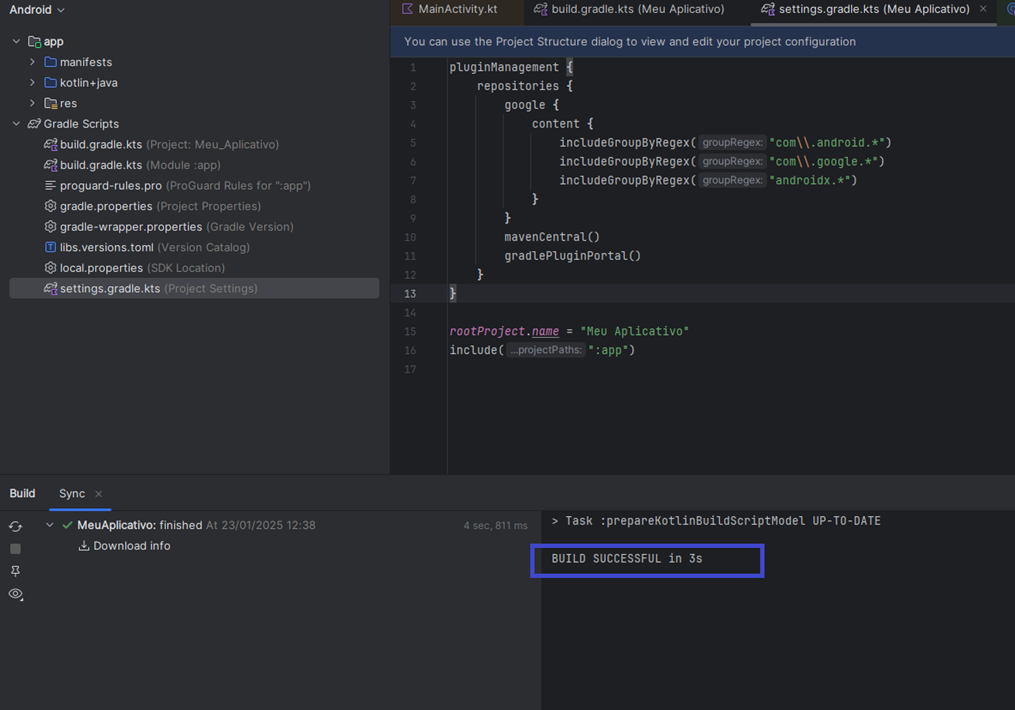
Neste ponto, você pode executar o comando 'Sincronizar Projeto com Arquivos Gradle' para sincronizar o projeto.\
Após as configurações feitas ,ao sincronizar e quando não ocorrer nenhum erro.A saída esperada no console deve ser: `BUILD SUCCESSFUL`.
Obs: Voce pode verificar se a biblioteca foi baixado através do seguinte caminho .\
Va em "ExternalLibraries"\
\

E busque por "tap", se a biblioteca estiver estiver aparecendo ,significa que foi feito o download com sucesso.\
\

---
# Agent Instructions
This documentation is published with GitBook. GitBook is the documentation platform designed so that both humans and AI agents can read, navigate, and reason over technical content effectively. Learn more at gitbook.com.
## Querying This Documentation
If you need additional information that is not directly available in this page, you can query the documentation by asking a question.
Perform an HTTP GET request on the following URL with the `ask` and `goal` query parameters:
```
GET https://ftcoders.first-tech.com/first-tech-ttp-sdk-pt/area-do-desenvolvedor/fazendo-download-do-sdk.md?ask=&goal=
```
`ask` is the immediate question: it should be specific, self-contained, and written in natural language.
`goal` is what the user is ultimately trying to achieve, the reason they need the answer. Sharing it helps GitBook give you a better, more relevant answer. A goal is most helpful when it describes the outcome the user wants rather than restating the question. For example, with `ask=how do I create an API token`, a goal like `automate deployments from our CI pipeline` lets GitBook tailor the answer to that use case.
The response will contain a direct answer to the question and relevant excerpts and sources from the documentation.
Use this mechanism when the answer is not explicitly present in the current page, you need clarification or additional context, or you want to retrieve related documentation sections.